Letterboxd vs Trakt: Which Movie and TV Tracker Is Right for You?
Letterboxd is the social network for film lovers. Trakt is the scrobbling tool for TV power users. They serve different people. Here is how to choose.

Letterboxd is the better home for films and film talk, and Trakt is the better home for TV, especially if you run Plex, Emby, Kodi, or Jellyfin. Most people searching “Letterboxd vs Trakt” are not choosing between them. They are working out which one fits the thing they actually do, and you can keep both.
Last verified November 3, 2026.
Letterboxd is a social network built around film. People log movies, write reviews, follow critics and friends, and build lists that circulate through the community. The social layer is the product.
Trakt is a scrobbler. It syncs with Plex, Emby, Kodi, and Jellyfin, tracks what you watch automatically, and stores detailed statistics about your viewing history. Most users treat it as a personal data layer, not a community.
The short version is this. If you watch mostly movies and want to be part of a film conversation, pick Letterboxd. If you watch a lot of TV and run a home media server, pick Trakt. If you want both on one shelf with your books and albums, read on.
Use both? Achriom brings your Letterboxd diary and your Trakt history into one library, and adds what you log in either one the next day. Movies, shows, books and albums on one shelf. Free, no item limit.
 Connect Letterboxd and Trakt →
What to look for in a media tracker
Five things separate a tracker you’ll actually use from one that collects data you ignore.
Logging style. Letterboxd makes logging a deliberate act. You rate, review, and date-stamp each film. Trakt supports both manual logging and passive scrobbling, pulling watch data from your media server without any manual input. The right style depends on whether you want a diary or a dashboard.
Social layer. Do you want to see what friends are watching, compare lists, or follow critics? Letterboxd is a genuine social network. Trakt has basic follow features, but community is not what it’s for.
TV support. Letterboxd covers film only. No episode tracking, no seasons, no series progress. Trakt covers both movies and TV at the episode level. For anyone watching ongoing TV, this distinction is decisive. Our guide to Letterboxd for TV shows lists the apps that fill that gap.
Export and API access. Both apps let you take your data out. Trakt’s API is documented and open to registered apps, and tools such as the open-source traktexport package build on it. If you want to move your history, the section on moving between Trakt and Letterboxd below walks through both directions.
Price. Both have free tiers that cover the essentials. Letterboxd Pro costs $18.99 a year in its US App Store listing and removes third-party ads. Trakt VIP costs $60 a year.
Letterboxd
Letterboxd launched in 2011 and spent several years as a cult platform before becoming one of the dominant film communities online. The diary is the center of it. You log a film, date the watch, rate it out of five stars, write a review if you want, and it becomes part of your public history.
The social features are genuinely good. People follow directors, critics, and friends. Lists are a core part of the platform, and the best ones travel widely through the community. There is a distinct Letterboxd sensibility, film-literate and often genre-curious, with a strong representation of horror fans, arthouse devotees, and people who engage seriously with annual best-of lists.
The app’s limitation is its scope. Letterboxd covers movies, plus some documentaries and TV movies. If you want to track a TV series, you are on your own.
Pricing is straightforward. The free tier covers core logging and shows third-party ads. Letterboxd’s own page lists what Pro adds, including ad removal, personalized stats pages, streaming service filters, and cloning lists. Pro is $18.99 a year and Patron is $48.99 a year on the US App Store listing. Patron includes everything in Pro plus preferred posters and backdrops and early access to some new features.
For anyone who primarily watches film and wants to be part of the conversation around it, Letterboxd is the natural home.
Trakt
Trakt started as a developer project and still has that aesthetic. The interface is functional rather than polished.
What Trakt lacks in style, it makes up in infrastructure. Connect it to Plex, Emby, Kodi, or Jellyfin, and your viewing history updates automatically as you watch. For TV in particular, this passive tracking is a significant advantage over any app that requires manual logging.
Coverage is broader than Letterboxd. Trakt tracks both movies and TV at the episode level. You can see exactly which episodes you’ve watched, follow progress through ongoing series, and get statistics about viewing hours across formats.
The API powers companion apps and third-party tools. If you ever want to build something with your viewing data or connect it to another service, Trakt is a natural foundation.
The social layer is thin. You can follow other users and see their recent watches, but it is nothing like Letterboxd’s community.
Pricing has moved. AlternativeTo reported that from May 20, 2025 every VIP renewal moves to a single $60 a year rate, and that Trakt set stricter limits for free users in February 2025. We could not open Trakt’s own pricing page, so check it before you pay. The free tier still covers basic tracking and scrobbling.
Achriom
Achriom tracks films, TV, books, albums, and anime in one library, free with no item limit. Its pitch next to these two is that you do not have to choose. It imports your Letterboxd profile, by username or from your export zip, and your Trakt history by username, episodes included.
Both stay connected. A Letterboxd diary syncs daily, with its dates, rewatches and ratings, and Trakt re-syncs daily too, so what you log in either one shows up on your Achriom shelf the next day. Only new activity at the source adds a title, and something you deleted in Achriom does not come back.
Logging is intentional rather than comprehensive. Achriom is not built for scrobbling from a media server or for capturing every background viewing session. Its value is having the films and shows you log elsewhere next to the books and albums that belong to the same taste. Your library exports as CSV whenever you want it.
Head-to-head comparison
| Feature | Achriom | Letterboxd | Trakt |
|---|---|---|---|
| Movies | Yes | Yes | Yes |
| TV tracking | Yes | No | Yes, episode level |
| Books | Yes | No | No |
| Music and albums | Yes | No | No |
| Imports the other two | Letterboxd and Trakt | No | No |
| Auto-scrobbling | No | No | Yes (Plex, Emby, Kodi, Jellyfin) |
| Social community | Optional, private by default | Strong | Minimal |
| Data export | Yes (CSV) | Yes | Yes |
| Free tier | Yes, no item limit | Yes, with ads | Yes |
| Paid plan | Pro, $9.99 a month or $99 a year | Pro, $18.99 a year | VIP, $60 a year |
Moving between Trakt and Letterboxd
Letterboxd and Trakt do not read each other’s files, so a move takes a few steps either way. If you only want both histories in one place, skip to the last paragraph of this section.
From Trakt to Letterboxd
- Sign in to trakt.tv in a browser, open Settings, then Data, and click Export now under Raw Export. Trakt emails a link to a ZIP of your watched movies and episodes, ratings, lists, and watchlist, per Refract’s Trakt export guide. Our Trakt export guide has the detail.
- Pull the movies out and put them in Letterboxd’s CSV format. Letterboxd’s import page says the first row must be a header with at least one of LetterboxdURI, tmdbID, imdbID, or Title. Optional columns include WatchedDate, Rating, and Review.
- Save the file as UTF-8 with dates as YYYY-MM-DD, and keep each file under 1MB. Split larger histories and repeat the header in every part.
- Upload it at letterboxd.com/import, check the summary of matched films, and confirm. Letterboxd warns there is no undo after that step.
Only the movies are worth carrying across, since Letterboxd has no place for episodes.
From Letterboxd to Trakt
- Export your data from Letterboxd. The zip includes a diary.csv with your watch dates.
- Trakt has no importer for Letterboxd files that we could confirm. A third-party script on GitHub, trakt---letterboxd-import, reads diary.csv and loads it into Trakt. It needs Python and a Trakt application you create yourself.
- Use diary.csv, not watched.csv. The script’s README says the watched file has no dates, so every film gets stamped with the time of the import.
Or skip the move
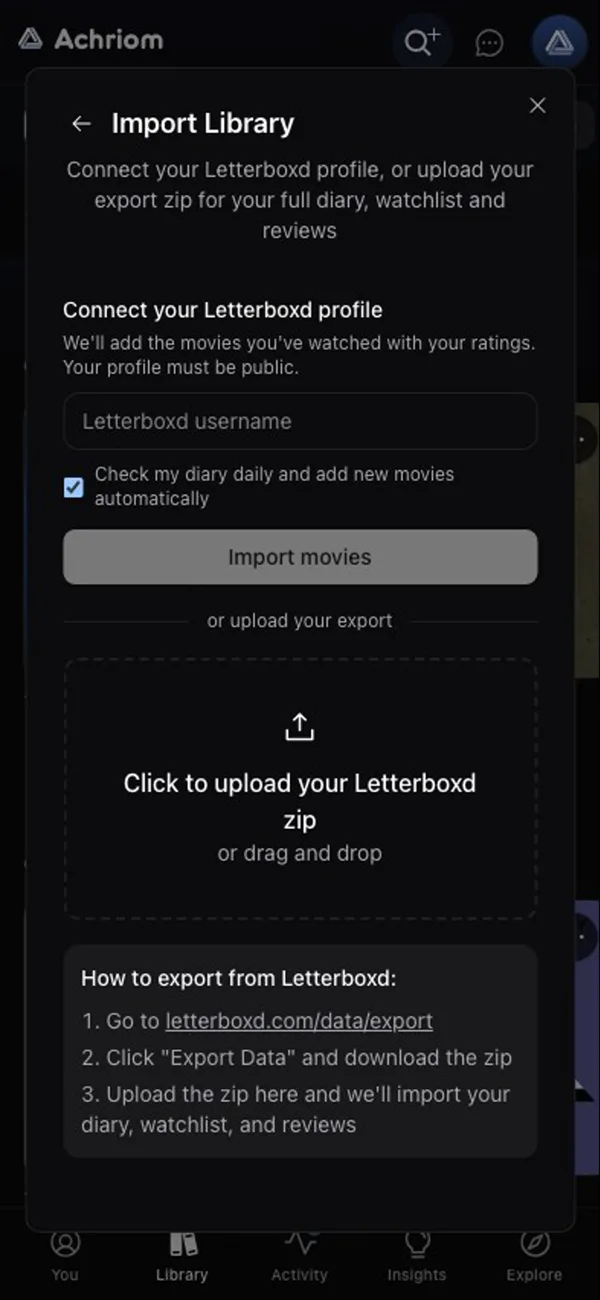
Achriom reads Letterboxd and Trakt directly. Connect a Letterboxd username (the profile has to be public) or upload your export zip, add your Trakt username, and both histories arrive in one library. Keep the daily check on and new diary entries and watched episodes follow the next day, so nothing has to be chosen.
Which should you use?
Use both, on one shelf, if you care about film culture and TV tracking, and about the books and albums that go with them. Keep Letterboxd for the diary and Trakt for the scrobbling, and let Achriom hold the combined library with your films, shows, books, and albums.
Choose Letterboxd if you primarily watch movies and want to be part of a film community. The diary format, the lists, and the social layer make it the strongest place to be a film person online.
Choose Trakt if you watch a lot of TV, run Plex or another home media server, or want passive scrobbling rather than manual logging.
Consider Achriom on its own if your taste does not stay in one lane. Films, TV, books, albums, and anime in one library, free with no item limit, and no need to pick between the two apps above.
Simkl comes up in the same searches. It is a third tracker for movies, TV, and anime, and our Simkl vs Trakt comparison covers how it differs from Trakt. Next to Letterboxd the split looks the same as with Trakt, a film diary with a community on one side and a tracker that follows what you stream on the other.
The honest answer
Letterboxd and Trakt are not really competitors. Letterboxd is a film social network. Trakt is a TV scrobbling platform with documented developer infrastructure. Asking which is better is a bit like asking whether a record collection is better than a filing system.
The real question is what you are trying to do. Log films and engage with a film community, and Letterboxd fits. Track TV automatically and own your viewing data, and Trakt fits. Keep it all on one shelf next to your books and albums, and Achriom fits.
For more on the TV side of this, our Serializd vs Trakt and Trakt vs TV Time comparisons go deeper into the TV tracker landscape. If you are leaving Letterboxd or Trakt behind, best Trakt alternatives and how to export your Letterboxd diary cover the way out.
Use both? Achriom brings your Letterboxd diary and your Trakt history into one library, and adds what you log in either one the next day. Movies, shows, books and albums on one shelf. Free, no item limit.
Connect Letterboxd and Trakt →Common questions
Does Letterboxd track TV shows?
No. Letterboxd covers movies only, including feature films and some TV movies. If you want to track TV series at the episode level, you need a separate app like Trakt or Serializd.
Is Trakt free to use?
Trakt has a free tier that covers basic tracking and scrobbling. VIP is $60 a year, the single renewal rate Trakt moved every plan to in May 2025, and it adds the extras free accounts are limited on.
Can I use Letterboxd and Trakt at the same time?
Yes. Letterboxd handles film logging and community, and Trakt handles TV scrobbling and home media server integration. Achriom can bring in both, so your Letterboxd diary and your Trakt history sit in one library.
Which app is better for Plex or Emby users?
Trakt. It integrates with Plex, Emby, Kodi, and Jellyfin through scrobbling plugins that track your viewing automatically. Letterboxd has no home media server integration.
How do I move my Trakt history to Letterboxd?
Export from Trakt under Settings, then Data, then Raw Export. Letterboxd will not read that file, so you convert the movies to Letterboxd’s CSV format and upload it at letterboxd.com/import, or you skip the conversion and import your Trakt username into Achriom.
How do I move my Letterboxd diary to Trakt?
Export your Letterboxd data and use the diary.csv file, then load it with a third-party script, because we found no official Trakt importer for Letterboxd files. Or connect your Letterboxd username to Achriom, which brings in the diary with its dates and ratings and keeps adding new entries the next day.
Does Letterboxd let you track rewatches?
Yes. Letterboxd lets you log each rewatch separately, with its own rating and review. This is one of the features film enthusiasts appreciate most about the platform.
Bring your shelf over
Start your library