How to Move Your AniList List to MyAnimeList (2026)
How to move your AniList anime list to MyAnimeList as a MAL XML file, with Achriom's free export or a community script, plus what carries over and what doesn't.
Some links below are affiliate links. As an Amazon Associate, Achriom earns from qualifying purchases. For books we prefer Bookshop.org, which supports independent bookstores.
To move your AniList anime list to MyAnimeList, import it into Achriom by username, export the anime as a MAL XML file from Settings, and upload that file on MyAnimeList’s import page. AniList has no button that hands you a MAL file, so the other route is a community script that builds one from AniList’s API, and those are covered below.
Your AniList username is all it needs. Make the list public, type the username, and your anime come over ready to export as MAL XML.
Import my AniList →Last verified November 12, 2026 against Achriom’s import dialog and export code and AniPy’s README. MyAnimeList’s import page needs a login, so its address is all we confirm.
What MyAnimeList reads
MyAnimeList imports a file in its own XML export format. AniPy’s README points at the same address for the upload, myanimelist.net/import.php, and the page needs you signed in to MyAnimeList. Every route in this guide ends with the same step: get an XML file in that format, then upload it there.
The XML identifies each anime by its MyAnimeList ID, which is why every route drops entries it can’t match to one. Check the count at the end.
The route with Achriom
- Make your AniList list public. Achriom’s import reads the public list and says so in the dialog: “Your AniList list must be public.”
- Sign in at achriom.com (free) and open the import dialog.
- Choose AniList, type your username and click Import anime list. Anime and manga come over with covers, status and progress.
- Untick “Check this account daily and keep my library in step with it” if you only want a one-off copy. Leave it ticked if you’re still logging on AniList and want new activity to follow.
- Open Settings and use Export Anime for MAL / AniList. You get one
.xmlfile. - Sign in to MyAnimeList, go to its import page and upload the file.
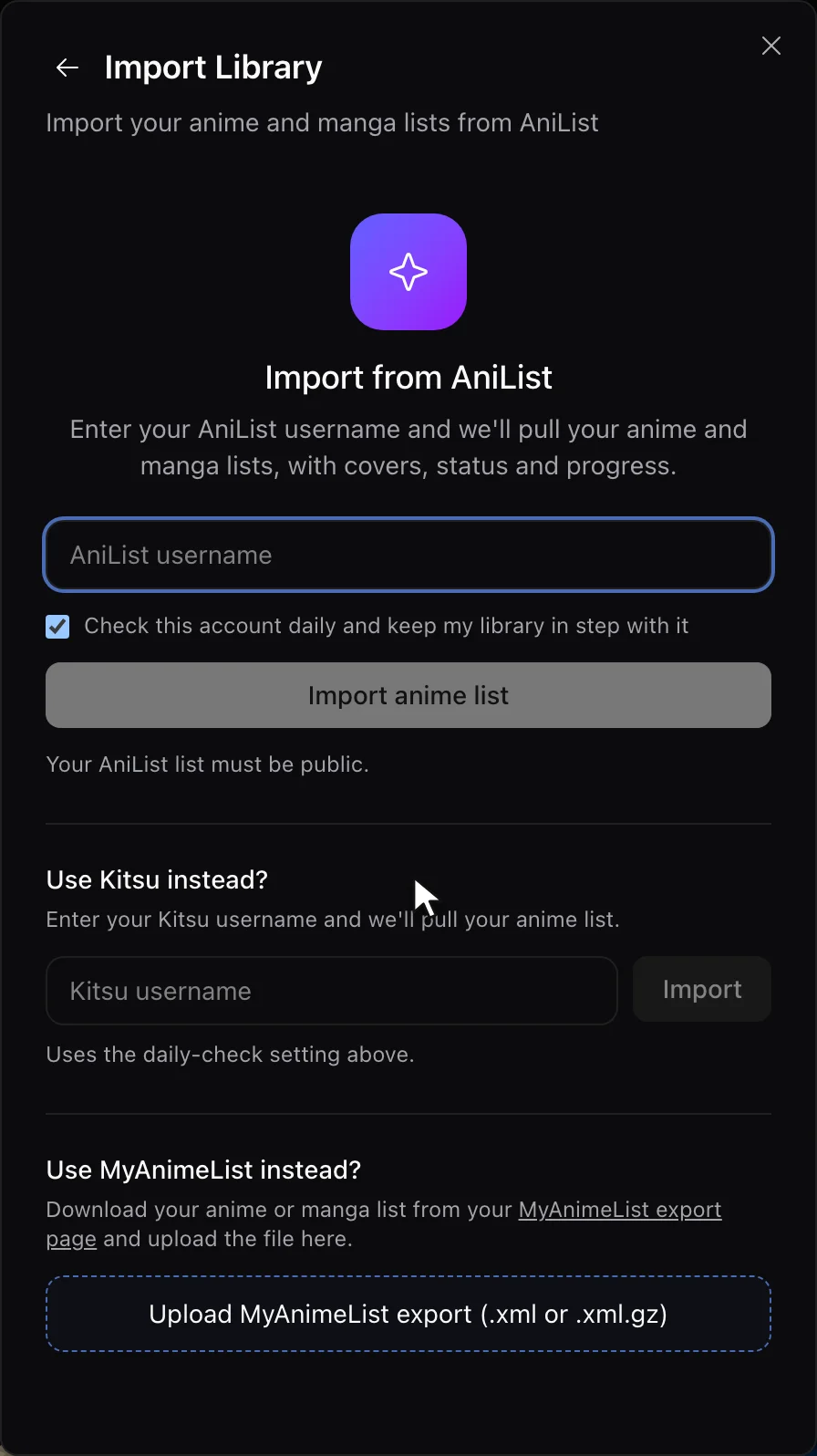
If the import says it can’t find the user, check the spelling and that the list is public. If it says AniList is unavailable, try again a little later.
Free accounts import and export with no item limit. Settings also has Export Library, which gives you CSV files, one per medium, if you want a spreadsheet copy as well.
What the XML carries
Each anime in the file has the status, episodes watched, your score, start and finish dates, notes and a rewatch count. Scores are written as whole numbers from 1 to 10 (Achriom converts AniList’s scale and rounds), and a title with no score is written as 0.
The one limit to know about is that the file only holds anime that Achriom matched to a MyAnimeList entry. An AniList entry with no MAL match stays in your Achriom library and in the CSV, and isn’t in the XML. After the upload, compare the totals on MyAnimeList with AniList’s and look for the gap. Then spot check two series, one you finished and one you’re partway through, such as Frieren: Beyond Journey’s End, and confirm the score and episode count.


The route with a community script
If you only want the file and would rather not sign up anywhere, AniPy is a free Python script that builds MAL XML straight from AniList. It’s one hobbyist’s open-source project, not AniList’s or MyAnimeList’s, so read what it does before you run it.
For a public list you run python anipy.py -user <your AniList name> -mal <your MyAnimeList name>. The -mal part matters, because its README says the XML is only exported when a MyAnimeList username is given (--m reuses your AniList name for that). You get anime.xml and manga.xml to upload on MyAnimeList’s import page, plus JSON backups and anime_NotInMal.json and manga_NotInMal.json for entries it couldn’t find on MyAnimeList, which is a handy list for the gap check below. A private list needs authenticated mode (--a), which uses a client ID and secret from AniList’s developer settings. Its README also lists a limit, that it can’t get full information from rewatches and re-reads.
It writes a file at one moment and doesn’t keep anything in step afterwards, which is also true of Achriom’s export unless you leave its daily check on.
What about manga?
Achriom’s MAL XML is anime only. The export does include your manga as a CSV (manga.csv), but that CSV isn’t a MyAnimeList import file. If you want your AniList manga on MyAnimeList too, use AniPy, which writes a manga XML. Your manga stays in Achriom either way.
What doesn’t move
A list file carries entries, scores, progress and notes. Followers, activity posts, reviews you wrote on AniList and your recommendations stay on AniList. Copy any reviews you care about by hand first.
Your private list can’t be imported into Achriom by username, because the import reads the public list. Make it public for the import, then set it back.
Moving to MyAnimeList also changes what you’re moving to. If you haven’t decided yet, AniList vs MyAnimeList in 2026 goes through the differences, including that MyAnimeList was sold to Gaudiy in 2025 and that AniList’s mobile apps are all third-party.
Keep it in both places
You don’t have to pick. Leave the daily check on and your Achriom library stays in step with AniList, so you can export a fresh MAL file whenever you want to refresh MyAnimeList. Achriom also holds your films, shows, books and albums beside the anime, and ten items in it builds your Taste Portrait. The librarian can answer questions across all of it, such as which of your highest-rated anime feel like the novels you rated highest.
Move it once, or keep both lists. One username brings the list over.
Bring my AniList over →If you’re coming from the other direction, the guides for exporting from MyAnimeList and Kitsu cover those lists, and How to Export Your AniList Data covers getting a plain backup file. For the wider field of anime trackers, Best Anime Tracking Apps in 2026 compares the established ones.
Related guides:
Common questions
How do I transfer my AniList to MyAnimeList?
Import your AniList list into Achriom by username (the list has to be public), use Export Anime for MAL / AniList in Settings to get an XML file, then upload it on MyAnimeList’s import page.
Does AniList have a MAL export?
Not that we found. A community script called AniPy builds the MyAnimeList XML from AniList’s API, or Achriom’s anime export does it without code.
Does the export include manga?
Achriom’s MAL XML is anime only, and its manga export is a CSV. AniPy writes a manga XML as well.
Why are some of my anime missing after the import?
The XML only holds anime that could be matched to a MyAnimeList entry. A title with no match is left out of the file, so compare your totals on both sites and add the gaps by hand.
Bring your shelf over
Start your library